Kaiku Labs — BUILD

Websites, apps, and systems that work.

For small businesses, local operators, solo founders, and education teams who need the thing working: landing pages, booking flows, dashboards, MVPs, and AI-assisted workflows.

Choose the problem you want off your plate.

Start with the part of the business that is leaking time, leads, or clarity. Kaiku Labs turns that into a first working version.

What is wasting time right now?

Pick the situation that sounds closest. Kaiku Labs starts there, then adds only what helps the workflow run.

ENQUIRIES

People visit but do not contact you

Turn the offer, proof, price range, FAQ, and WhatsApp contact path into a page that helps them decide.

TRACKING

Bookings, payment proof, or follow-up get missed

Move the important details out of memory and into a clear flow your team can check.

PRODUCT

Customers, students, or admins need to log in

Give them a simple dashboard, portal, learning path, or MVP built around the first real action.

BUSYWORK

Your team repeats the same replies or reports

Use drafts, search, summaries, routing, and answer support where a human still approves the final step.

Proof that starts with the workflow.

These examples show the type of working system Kaiku Labs can shape. The claim stays specific to what was actually built.

Booking and renewal flow for a study room

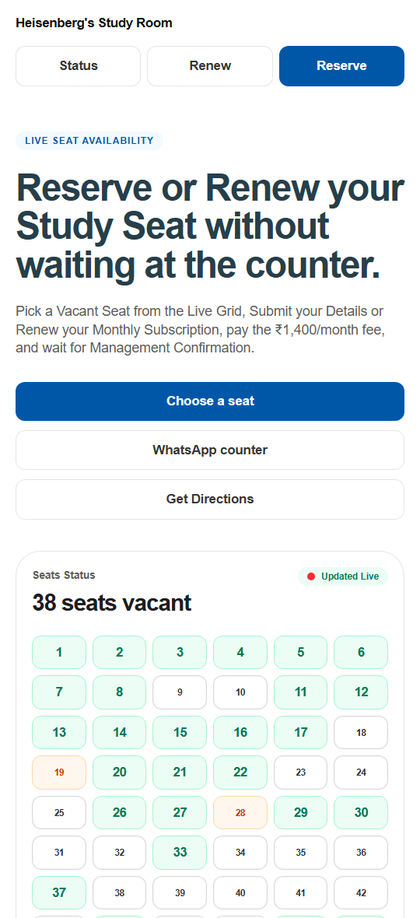
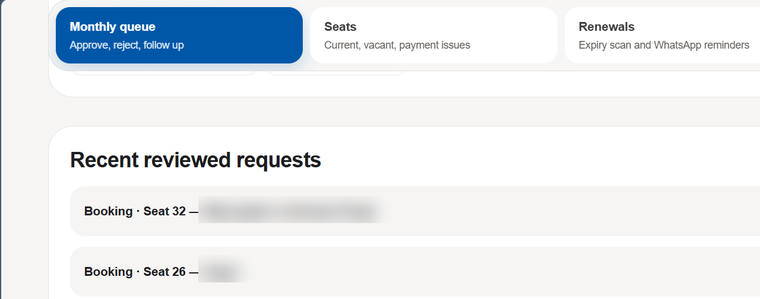
Kaiku Labs built live seat availability, reservation, renewal, payment proof, and admin status handling for Heisenberg's Study Room.

  1. Student enquiry
  2. Seat status
  3. Payment proof
  4. Admin update

Useful when bookings, payment screenshots, renewals, or follow-up status are getting lost.

Mobile booking page showing Heisenberg's Study Room reservation buttons and a live seat availability grid.
Heisenberg admin page showing monthly queue, seats, renewals, and recent reviewed requests with names blurred.

Learning product flow with practice loops

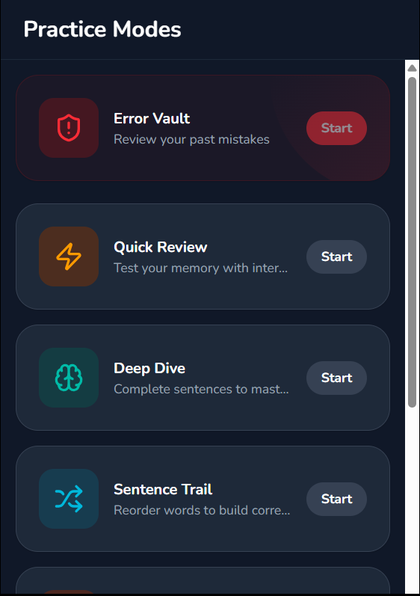
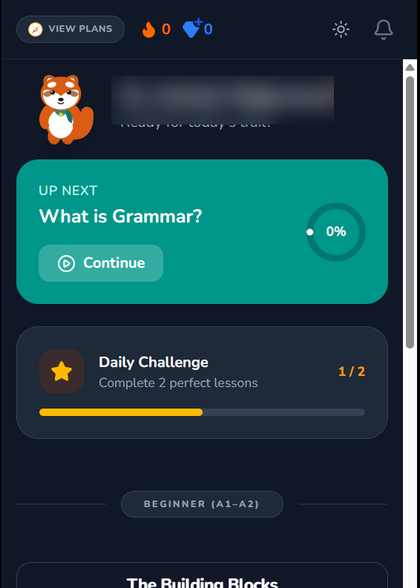
GrammarScout is a public learning app example with lessons, practice modes, progress loops, and AI-assisted education workflows.

  1. Learning path
  2. Practice mode
  3. Review loop
  4. Progress view

Useful when an idea needs a dashboard, portal, MVP, course product, or student practice flow.

GrammarScout practice modes screen showing review, deep dive, sentence trail, and other learning actions.
GrammarScout logged-in dashboard showing next lesson and daily challenge progress with the learner name blurred.

Stock, sales and customer dues—on one clear screen.

See how an egg warehouse can keep vehicle stock, sales, payments, reports and change history together. All screenshots use fictional demo data.

Read the Gulanjoy case study

From messy workflow to one useful version.

No giant app by default. Kaiku Labs maps the current workaround, builds the smallest useful version, and gives your team something they can run.

01

Show the messy part

Send the DMs, Sheet, current page, screenshots, or workaround that keeps slowing things down.

02

Choose the useful first version

Website, booking tracker, dashboard, portal, or AI helper: whatever solves the real job first.

03

Build and test it on real screens

Make the flow work for visitors, customers, admins, or learners before adding extra features.

04

Give your team the working version

You get the link, admin view, notes, and what to improve next.

Small enough to start. Useful enough to run.

01

Map what happens today

Look at your messages, forms, Sheets, calls, or current app and find the work that keeps slipping.

02

Build one working version

A decision page, tracker, dashboard, portal, MVP, or assistant focused on the first real job.

03

Make it easy to keep using

Test on real screens, clean up the admin steps, and leave notes your team can follow.

Common questions

Send the keyword BUILD and say what keeps slipping: enquiries, bookings, payment proof, follow-ups, a dashboard idea, or repeated admin work.

DM BUILD with the workflow you want off your plate.

Tell us the business type, what keeps slipping, and what you want working first.